Post-engine sound
Effects
Single mode feeds one clip-local stereo chain with six reorderable blocks: Tone / Drive, Bits / Rate, Delay, Stereo / Rotary, Tape, and Reverb. Split gives each part private Color and Stereo / Rotary inserts, then shared Delay/Reverb sends and Tape.
The figures below use Lanes in Single mode, where these are pages 7–11 of 15. Page numbers depend on the engine and mode. Use the page title to find a control; changing FX Order changes the audio path while the parameter pages stay in place.
Input Monitor bypasses the engines, effects, and program compressor, and joins the final limiter. Resample captures processed instrument audio before the program compressor and limiter. Browser preview follows the routing described under Sample preview.
The final safety limiter smooths fast peaks from overlapping notes and live parameter changes with 1.5 ms of lookahead. Both channels share the same gain, preserving their stereo balance.
Multi-instrument effects: Use Capture + Menu → FX SENDS to open FX Sends. In dual modes, knobs 1–4 send A/B to Delay and Reverb; knobs 5–6 set Priority Duck direction/depth and threshold. Main click opens a menu for every effect page, including the remaining Priority controls. Each part’s Color and Rotary are private inserts; Delay, Reverb and Tape are shared. Delay and Reverb MIX are on their return pages. Quad uses all eight send positions and bypasses Priority Duck; see Quad mixing.
Dual-mode sends and priority
Split and Shared Dual use this same FX Sends page. Hold Capture and press Menu, choose FX SENDS, then click the main encoder. A send feeds Delay or Reverb; the corresponding return page’s MIX controls how much wet sound reaches the output.
| Knob | Display | Range | What it controls |
|---|---|---|---|
| 1 | ADLY | 0–100% | A Delay send. Increase this to hear A in the shared delay. |
| 2 | AREV | 0–100% | A Reverb send. Increase this to hear A in the shared reverb. |
| 3 | BDLY | 0–100% | B Delay send. Increase this to hear B in the shared delay. |
| 4 | BREV | 0–100% | B Reverb send. Increase this to hear B in the shared reverb. |
| 5 | PRIO | OFF; A>B / B>A, 0–24 dB | Selects the dominant part and the maximum attenuation of the other. OFF disables ducking. A>B lets A duck B; B>A lets B duck A. |
| 6 | THR | −60–0 dBFS | Detector threshold. Lower values react to quieter material; higher values wait for stronger peaks. |
| 7 | CURV | Linear / Power | Blend Curve. Power keeps a fuller midpoint with unrelated sources; Linear suits related or correlated material. |
| 8 | BLND | 0–100% | Blend moves from A alone at 0% to B alone at 100%. |
Sends follow each part’s level, mute, Blend and, when ROUT is Dry + Sends, Priority attenuation. Existing echo and reverb tails continue when a part fades or ducks. A raised send still needs MIX above zero on its Delay or Reverb page.
Priority Duck
Priority Duck keeps one dual-mode instrument clear when both occupy the same spectral or rhythmic space. Its stereo-linked detector listens to the dominant part after its private inserts and level, before the A/B crossfade. One gain value is applied to both channels of the subordinate part, preserving its stereo image. The response uses a soft 4:1 curve and never exceeds PRIO’s selected maximum attenuation.
| Knob | Display | Range | What it controls |
|---|---|---|---|
| 1 | ATK | 1–250 ms | How quickly the subordinate part moves down after the dominant part crosses THR. |
| 2 | HOLD | 0–1000 ms | Minimum time to retain the current reduction before release begins. |
| 3 | REL | 10 ms–3.0 s | How quickly the subordinate part returns after the detector falls. |
| 4 | HPF | 20–2000 Hz | High-pass frequency in the detector only. Raise it when low-frequency energy should not trigger ducking. |
| 5 | KNEE | 0–24 dB | Width of the soft transition around THR. Zero is firm; larger values enter reduction more gradually. |
| 6 | ROUT | Dry / Dry + Sends | Dry ducks the subordinate dry path while its new effect sends remain open. Dry + Sends ducks both dry audio and new send input. Existing tails are unaffected. |
| 7–8 | □ | Reserved | Available for future Priority controls. |
Find a dual-mode effects page
From FX Sends, click the main encoder to open FX Pages. Turn or use Up/Down to choose Priority Duck, Delay, Reverb, the focused part’s Color or Stereo / Rotary inserts, shared Tape, or Effect Order. Click to open. Back returns from an effect page to the menu, then back to FX Sends; Menu returns to waveforms. Capture switches A/B focus, and private insert labels follow the selected part.
Effects — every parameter
Effects · Single mode
In multi-instrument modes, TONE/DRIV/BITS/RATE are knobs 1–4 on the focused part’s Color page; DLY/FDBK/WDTH are knobs 1–3 on Delay Return. Delay and Reverb return MIX are on knob 8 of their effect pages in every multi-instrument mode.
| Knob | Display | Range | What it controls |
|---|---|---|---|
| 1 | TONE | −1.00–1.00 | Darkens toward −1 with a low-pass contour; brightens toward +1 by progressively removing low frequencies. Zero is bypass. |
| 2 | DRIV | 0.00–1.00 | Drive adds level-dependent soft saturation within the Tone / Drive block. Its smoothed, continuous transfer does not generate isolated clicks, although added level and harmonics can make an existing edge more prominent. |
| 3 | BITS | 0.00–1.00 | Moves from transparent resolution toward coarse four-bit quantization. Quantizer edges are deliberately digital; use 0.00 when clean playback is required. |
| 4 | RATE | 1–16 | Holds each stereo sample for this many output frames. Values above 1 deliberately create stepped high-frequency edges; use 1 for full-rate clean playback. |
| 5 | DLY | 1–750 ms | Free-running delay time in milliseconds. Live and recorded changes use uninterrupted tap crossfades; a new value arriving mid-transition is queued rather than jumping the active read head. |
| 6 | FDBK | 0–90% | Amount returned to the delay. The feedback path is safely limited but high values can still build a dense tail. |
| 7 | WDTH | 0–100% | At 0%, each delay channel feeds itself. At 100%, left and right cross-feed for ping-pong motion. |
| 8 | MIX | 0–100% | Delay wet balance or shared Delay return. At 0%, Delay is dry; the other effects remain active in their chosen order. |
DRIV uses 4× oversampling to reduce harsh aliasing on bright material and high notes. At zero, the clean signal retains its full frequency response. The effects path retains a fixed additional delay of about 0.54 ms as Drive changes.
Continuous effect controls glide during live moves and recorded automation. Ordinary tone, drive, feedback, stereo, rotary, and tape changes use a short 5 ms response; wet/dry controls use a longer 12 ms fade because they blend signals with different phases. Delay-time changes use a 10 ms tap crossfade and complete it before moving toward the newest queued value. Changes to BITS and RATE also crossfade over 10 ms, keeping the deliberately stepped reduction sound without abruptly switching settings. Rapid edits finish their active fade before applying the newest value.
Stereo / Rotary
| Knob | Display | Range | What it controls |
|---|---|---|---|
| 1 | X-PN | −100–100 | Cross-pans the complete stereo image. NORM at −100 preserves left and right, MONO at 0 sends their averaged sum to both outputs, and SWAP at +100 exchanges left and right. Intermediate values progressively collapse or reopen the field. |
| 2 | RATE | 0.00–8.00 Hz | Sets the high-horn target speed; the low drum runs slightly slower. At 0.00, both rotors brake to a stop at their current angles rather than resetting their phase. |
| 3 | DPTH | 0–100% | Controls stereo level motion and Doppler pitch depth for the independently moving high horn and low drum. |
| 4 | SPRD | 0–100% | Controls only the width of the rotary wet signal. Zero folds the cabinet to mono while retaining its movement; 100% preserves the full modeled stereo field. |
| 5 | RAMP | 50 ms–8.00 s | Sets rotor acceleration and braking inertia. The high horn responds first and the heavier low drum follows more slowly. Encoder spacing is finer below 500 ms and progressively broader for long ramps. |
| 6 | BAL | DRUM–EVEN–HORN | Balances the low drum against the high horn. The end positions isolate one rotor; EVEN keeps both bands at equal nominal gain. |
| 7 | XOVR | 250–2000 Hz | Sets the crossover between the drum and horn. Lower values give more of the sound to the horn; higher values give more to the drum. Encoder steps are deliberately finer in the lower range. |
| 8 | MIX | 0–100% | Blends the rotary cabinet with the cross-panned signal. Zero bypasses the rotary stage; 100% is the rotating cabinet alone. Its lower-right position matches MIX on the main Effects page. |
The rotary stage splits the signal into a low drum and high horn, moves them at related but different rates, and combines stereo amplitude movement with short modulated delays. The high horn accelerates faster than the heavier drum. A reduced amount of the original side signal is retained so unusually wide or phase-opposed stereo material does not disappear. X-PAN is before Rotary, while SPRD acts on the rotary wet signal only, so MONO can deliberately give the speaker a centered source that the cabinet spreads into motion.
Tape
| Knob | Display | Range | What it controls |
|---|---|---|---|
| 1 | FMT | 2″, 1″, ½″, ¼″, ⅛″ | Selects a tape-width character. Wider settings retain more bandwidth and stereo separation with gentler saturation; narrower settings progressively soften the top end, narrow the image, increase the head contour, and compress peaks. Changes morph the modeled head geometry and condition over 20 ms instead of jumping the read position. The default is 2″. |
| 2 | REC | 0–100% | Sets the record-head level. Higher settings add level-dependent compression and restrained saturation before the tape condition is applied. |
| 3 | AGE | 0–100% | Moves from fresh tape toward worn media by reducing high-frequency bandwidth, narrowing stereo width, softening transients, strengthening the head contour, and increasing compression. It does not automatically add loud hiss. |
| 4 | CRNK | 0–100% | Controls the frequency and depth of occasional soft tape-drag events. Each event briefly reduces bandwidth and level with a small, smoothly moving speed sag. It does not generate dust, scratches, clicks, pops, or phonograph-style surface noise. Zero is clean. |
| 5 | MECH | 0–100% | Combines wow, flutter, and non-periodic transport drift. Both channels follow the same moving reader. The macro primarily increases depth; zero removes its extra transport delay. At partial MIX, intentional transport movement can produce chorusing. |
| 6 | INRT | OFF, 50 ms–4.0 s | Adds mechanical deceleration and acceleration to Loop Stack Hold. Higher settings take longer to stop and restart. At rest the tape wet path is silent; releasing Hold returns it with a rising varispeed gesture. OFF leaves Stack Hold unchanged. |
| 7 | HISS | OFF, −83–−54 dBFS | Sets a filtered stereo tape-noise floor in decibels. The bottom −84 dBFS detent is displayed as OFF and generates no noise. Hiss level remains independent of FMT and AGE; the default −72 dBFS setting is deliberately restrained. |
| 8 | MIX | 0–100% | Blends the Tape path against an uncolored, latency-matched reference at Tape’s position in FX Order. Its audio taper gives finer control over subtle amounts. Zero removes Tape coloration, hiss and transport movement. Every MIX setting retains the same two-sample base reference. |
FMT is a musical character macro rather than a calibration of one particular recorder. The first four choices correspond to familiar professional open-reel tape widths. The ⅛″ label is familiar cassette shorthand; compact cassette tape is actually 0.150″ (3.81 mm) wide. Tape speed, track layout, formulation, and machine alignment also affect real tape fidelity. FMT establishes a physical baseline, so AGE, CRNK, and MECH become somewhat more pronounced on narrower formats.
Aligned Tape mixing: with MECH and CRNK at zero and INRT off, the dry and wet paths share a two-sample reference (about 0.045 ms at 44.1 kHz). MIX therefore blends coloration without the former 7 ms timing mismatch. FMT and AGE retain bandwidth, saturation, head contour and stereo-width changes; they no longer offset right-channel timing. Mechanical movement and tape-stop gestures add intentional delay to the wet path and can still create chorusing at partial MIX. Hiss remains an independent stereo noise source.
INRT affects only the Tape wet path. At MIX below 100%, the untreated portion continues while the modeled transport stops. This keeps Stack Hold useful as a subtle gesture at low tape mixes and allows a complete tape stop at 100%. The stop and return retain the duration in use when the gesture began. Changes to INRT during the gesture take effect after the transport returns to normal; turning it OFF initiates that smooth return.
Reverb
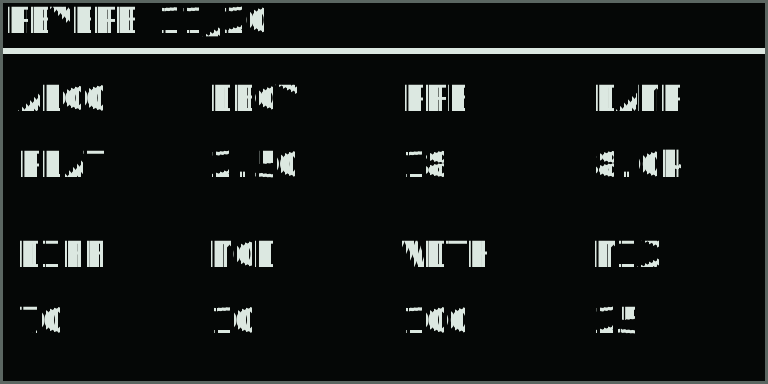
| Knob | Display | Range | What it controls |
|---|---|---|---|
| 1 | ALGO | Plate / Room | Algorithm. Plate is a dense Dattorro-style reverb; Room is a lighter four-line feedback-delay network for tighter spaces. |
| 2 | DECY | 0.20–20.0 s | Decay. Controls the nominal tail duration; damping and source material also affect the audible length. Encoder spacing is finer for short decays. |
| 3 | PRE | 0–200 ms | Predelay. Separates the onset of the reverberation from the dry sound. Changes use queued tap crossfades. |
| 4 | DAMP | 500 Hz–18 kHz | Damping. Darkens high frequencies inside the reverberation. The upper limit also follows the audio sample rate. |
| 5 | DIFF | 0–100% | Diffusion. Controls how strongly the input and tank allpass sections scatter the sound; low values reveal more discrete echoes. |
| 6 | MOD | 0–100% | Modulation. Adds gentle movement to internal delay reads. Room uses less movement than Plate. |
| 7 | WDTH | 0–100% | Stereo width. Zero centres the wet signal; 100% retains its full stereo field. Dry stereo remains intact. |
| 8 | MIX | 0–100% | Wet/dry balance. Zero is a transparent, sleeping reverb stage. Raising it starts a fresh tail; lowering it smoothly fades the tail out. |
Only the selected algorithm runs. Algorithm changes fade the wet path to dry over 20 ms, start the new network, and fade it back in over 20 ms. The previous algorithm's tail fades away. Plate preserves side excitation from phase-opposed stereo sources. Both algorithms use the original audio sample rate. A 20 Hz filter on the wet input prevents DC offsets building up in long tails; the dry signal retains its bass response.
FX Order
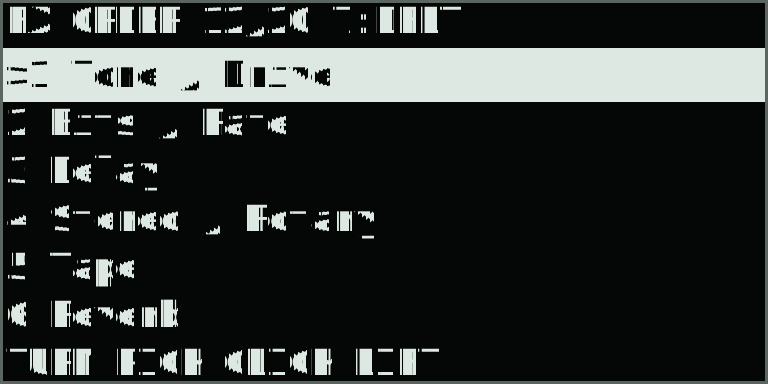
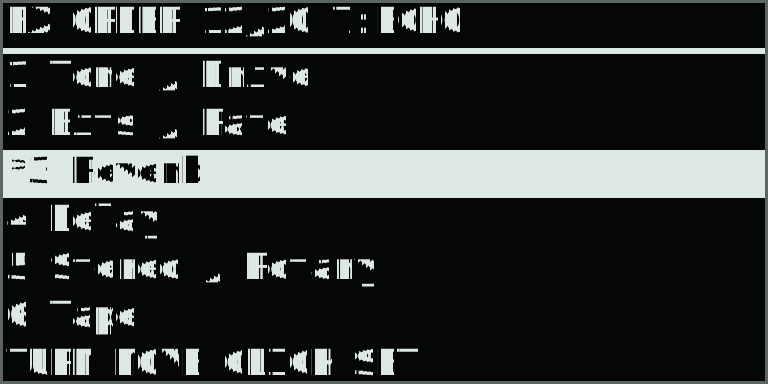
| Control | Display | Action | What it controls |
|---|---|---|---|
| Main encoder turn | Highlighted row | Select / move | Highlight an effect. After lifting it, move the effect up or down; intervening effects shift around it. |
| Main encoder click | * on lifted row | Lift / drop | Lift the selected effect. Click again to drop it and apply the complete order. On this page the main click edits routing; the Record button remains available for performance recording. |
| Back | ORDER CANCELLED | Cancel | Cancel the current move or pending preset and restore the active order. With no pending edit, Back returns to FX Pages if opened from that menu; otherwise it returns to the waveform. |
| Knob 7 | 7:DFLT / ECHO / CRSH / CUST | Starting preset | Stage a complete starting order, then click the main encoder to apply. In Single: DFLT places Reverb last; ECHO places it before Delay; CRSH starts with Reverb, then Bits/Rate and Tone/Drive. Multi-instrument modes use the Tape placements below. CUST identifies a manually arranged order. |
Tone / Drive keeps Tone before Drive. Bits / Rate keeps the two reduction controls together. Stereo / Rotary keeps Cross-pan before Rotary. In Single each of the six blocks appears once, giving 720 possible orders. Parameter pages keep their usual positions as the audio order changes.
In multi-instrument modes, private inserts keep their fixed order. FX Order lists only Delay, Tape, and Reverb. Their sends remain parallel: moving Delay above Reverb does not feed echoes into reverb. Tape’s position determines which returns receive tape processing.
| Display | Multi-instrument order | What it controls |
|---|---|---|
| DFLT | Delay → Reverb → Tape | Tape processes the dry sum and both effect returns. |
| ECHO | Delay → Tape → Reverb | Tape processes the dry sum and Delay return; Reverb joins afterward. |
| CRSH | Tape → Delay → Reverb | Tape processes the dry sum; both returns join afterward. |
See the Split signal-flow diagram for the private and shared paths.
Moving a block or staging a preset does not change the sound until the main click confirms it. Applying uses a 20 ms fade down, switches at silence, then fades up over 20 ms. A short level dip is normal. Delay, rotary, tape and reverb histories remain in memory; their subsequent sound follows the new routing. The compressor and safety limiter always follow the customizable chain, and Input Monitor remains dry.
Reverb settings and the applied order belong to the selected performance clip and return next session. During Replace or Overdub, reverb edits and dropped order changes are recorded. The whole order is one stepped event, so playback cannot pass through partial routes. Changing clips, leaving the page, or closing parameters cancels an unfinished move.
Good starting points
Core effects starting points
| Starting point | TONE | DRIV | BITS | RATE | DLY | FDBK | WDTH | MIX |
|---|---|---|---|---|---|---|---|---|
| Warm stack | −0.20 | 0.18 | 0.00 | 1 | 250 ms | 20% | 40% | 0% |
| Dry digital edge | 0.08 | 0.12 | 0.35 | 4 | 90 ms | 12% | 0% | 8% |
| Wide repeat | −0.10 | 0.08 | 0.00 | 1 | 375 ms | 55% | 100% | 30% |
| Unstable trail | 0.15 | 0.22 | 0.18 | 2 | 143 ms | 72% | 100% | 42% |
Stereo / rotary starting points
| Starting point | X-PN | RATE | DPTH | MIX | RAMP | BAL | XOVR | SPRD |
|---|---|---|---|---|---|---|---|---|
| Original field | NORM | 0.80 Hz | 70% | 0% | 350 ms | EVEN | 800 Hz | 100% |
| Centered source | MONO | 0.80 Hz | 70% | 0% | 350 ms | EVEN | 800 Hz | 100% |
| Slow cabinet | NORM | 0.80 Hz | 65% | 35% | 900 ms | DRUM 15% | 700 Hz | 85% |
| Fast cabinet | NORM | 6.20 Hz | 85% | 55% | 250 ms | HORN 20% | 950 Hz | 100% |
| Stopped cabinet | MONO | 0.00 Hz | 75% | 55% | 2.00 s | EVEN | 800 Hz | 100% |
| Narrow reversed field | SWAP | 2.40 Hz | 75% | 45% | 500 ms | EVEN | 800 Hz | 35% |
Tape starting points
| Starting point | FMT | REC | AGE | CRNK | MECH | INRT | HISS | MIX |
|---|---|---|---|---|---|---|---|---|
| Mastering reel | 2″ | 10% | 8% | 0% | 5% | OFF | −72 dBFS | 28% |
| Warm quarter-inch | ¼″ | 24% | 24% | 4% | 9% | OFF | −70 dBFS | 42% |
| Stable cassette | ⅛″ | 18% | 18% | 3% | 8% | OFF | −68 dBFS | 50% |
| Worn transport | ⅛″ | 30% | 68% | 55% | 48% | 1.2 s | −64 dBFS | 68% |
| Full tape stop | ¼″ | 18% | 25% | 8% | 18% | 1.2 s | −72 dBFS | 100% |
Resampling and audition: Resample writes post-effects instrument audio before the program compressor and final limiter; it excludes direct Input Monitor. Part-mode preview uses the complete chain in Single. In multi-instrument modes it follows the destination part’s level and mute, plus dual-mode Blend, shared Tape, and mastering; Shared Dual uses the focused part as its destination. Part preview in these modes bypasses private inserts and does not feed Delay/Reverb sends. Direct preview bypasses effects and part mixing, then joins the program compressor and final limiter.
Performance-loop motion
Effect parameters and applied FX Order changes can be recorded in a performance loop. In multi-instrument modes this includes every part’s insert settings and the shared sends and effects. Begin Replace or Overdub recording, then turn an encoder. Continuous values interpolate between recorded points; stepped choices change at their recorded thresholds while their audio paths retain the appropriate safety transition. Undo Take removes the newest layer of effect motion together with the other notes and gestures in that take.